Experience the Future of Learning

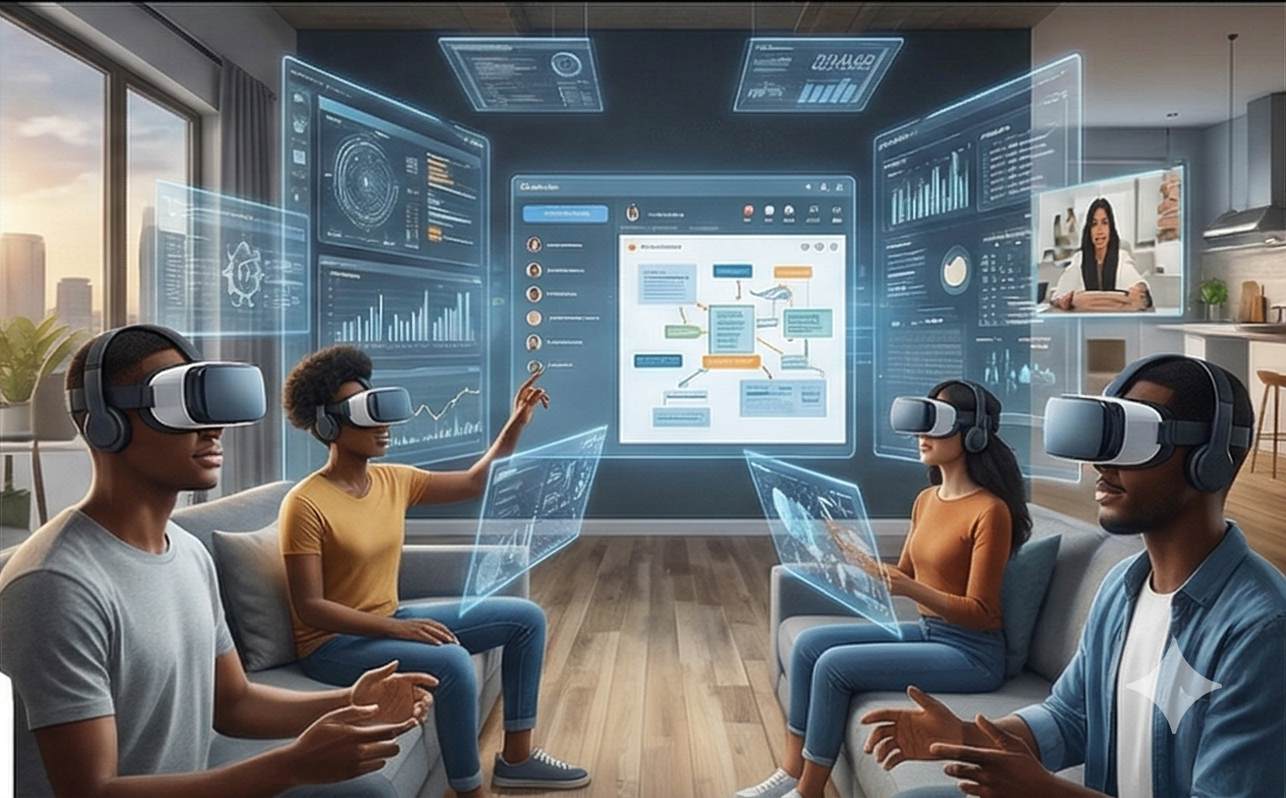
IHU's Virtual Classroom isn't just a video call — it's a fully immersive digital learning environment designed to rival and surpass the traditional campus experience. Powered by AI-enhanced tools, real-time collaboration, and a seamless interface, our virtual campus puts a world-class American education at your fingertips — no matter where you are.

IHU Virtual Classroom Experience

Built for Serious Learning, Designed for Real Life

Our virtual classroom platform was purpose-built with one goal: to create the most effective online learning experience available anywhere.

Unlike generic video conferencing tools repurposed for education, IHU's Virtual Classroom is an integrated academic ecosystem. Every feature — from lecture delivery and assignment submission to peer collaboration and faculty office hours — exists within a single, unified platform. Students never need to switch between apps, download third-party software, or navigate disconnected systems.

The platform is accessible via any modern web browser on desktop, laptop, tablet, or smartphone. It is designed with accessibility at its core, ensuring that students with varying abilities and internet speeds can participate fully. Content adapts to your device, your bandwidth, and your schedule.

Every interaction within the virtual classroom is secured with enterprise-grade encryption, ensuring that your academic work, personal data, and communications remain private and protected at all times.
Everything You Need in One Place

Our virtual classroom brings together every tool, resource, and interaction space a student needs — integrated seamlessly into a single, intuitive platform.

01

Live Lecture Hall

Attend real-time lectures with HD video and audio. Interact with professors through live chat, raise-hand features, polls, and breakout rooms. Every live session is automatically recorded and available for replay within 2 hours.

  • HD video streaming with screen sharing
  • Interactive whiteboard and annotations
  • Breakout rooms for group activities
  • Automatic recording and replay
02

On-Demand Content Library

Access pre-recorded video lectures, interactive modules, downloadable readings, and multimedia resources anytime. Content is organized by week, topic, and difficulty level — learn at your own pace and revisit as needed.

  • Structured weekly content modules
  • Multi-format resources (video, PDF, audio)
  • Adjustable playback speed
  • Closed captions and transcripts
03

Assignment & Assessment Hub

Submit assignments, take quizzes, complete timed exams, and receive graded feedback — all within the platform. Our anti-plagiarism engine ensures academic integrity, while rubric-based grading provides transparent evaluation.

  • Online submission with file upload
  • Timed quizzes and proctored exams
  • Plagiarism detection engine
  • Rubric-based feedback from faculty
04

Discussion Forums

Engage in threaded academic discussions with classmates and instructors. Each course has dedicated forums for weekly topics, Q&A, project collaboration, and open dialogue — fostering the peer learning that drives deeper understanding.

  • Course-specific and general forums
  • Threaded replies with rich text formatting
  • Instructor participation and moderation
  • Searchable archive of past discussions
05

Group Collaboration Workspace

Work on team projects with shared documents, task boards, and video conferencing built directly into the platform. Manage group deadlines, assign tasks, and track contributions — all in one collaborative space.

  • Shared document editing in real time
  • Task board with assignment tracking
  • Built-in group video calls
  • File sharing and version control
06

Progress & Analytics Dashboard

Track your academic journey in real time. View grades, attendance records, assignment completion rates, and degree progress through intuitive visualizations. Set personal goals and receive smart notifications to stay on track.

  • Real-time grade tracking
  • Degree completion progress bar
  • Attendance and engagement metrics
  • Smart deadline notifications

Intelligent Tools That Adapt to You

IHU's virtual classroom leverages artificial intelligence to personalize your learning experience, anticipate your needs, and help you achieve more — faster.

AI Study Assistant

Your personal AI companion answers questions, summarizes lectures, suggests study resources, and creates personalized review quizzes based on your performance patterns.

Adaptive Learning Paths

The platform analyzes your strengths and weaknesses, then adjusts content recommendations and practice exercises to target areas where you need the most improvement.

Smart Notifications

Receive intelligent reminders about upcoming deadlines, suggested study times based on your habits, and alerts when new content relevant to your interests is published.

Real-Time Translation

AI-powered translation tools help multilingual students access course materials in their preferred language and participate in discussions across language barriers.

Writing Enhancement

Built-in AI writing tools provide grammar corrections, style suggestions, citation formatting, and academic tone guidance as you draft essays and research papers.

Performance Predictions

Predictive analytics identify students who may be at risk of falling behind, enabling proactive outreach from academic advisors and timely intervention.

See the Virtual Classroom in Action

Walk through the key areas of the IHU virtual campus and see how each component works together to create a seamless learning experience.

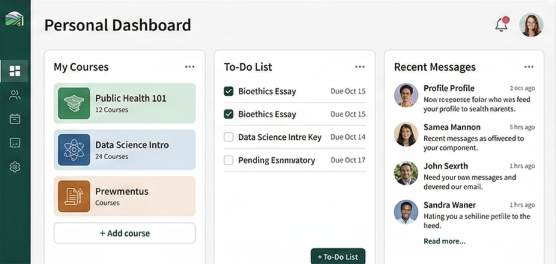
IHU Dashboard
IHU Dashboard Screenshot
Step 1

Your Personal Dashboard

Upon login, you're greeted with a personalized dashboard showing your enrolled courses, upcoming deadlines, recent announcements, and quick links to your most-used tools. Everything you need is one click away.

  • Today's schedule at a glance
  • Pending assignments and due dates
  • Recent grades and faculty messages
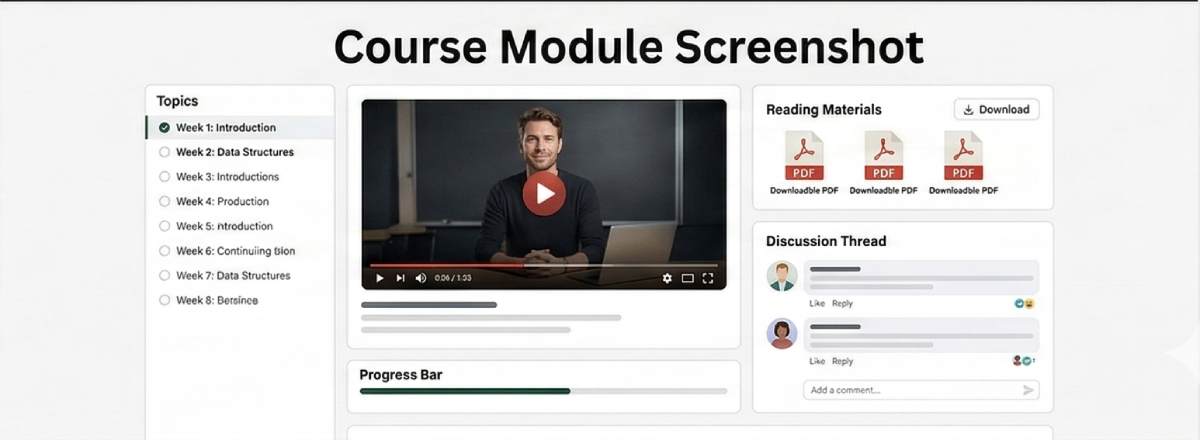
Course Module
IHU Course Module Screenshot
Step 2

Inside a Course

Each course features a structured weekly layout with video lectures, reading materials, discussion prompts, and assignments. Progress indicators show exactly where you are and what's coming next.

  • Weekly module organization
  • Integrated video player with notes
  • Progress tracking per module
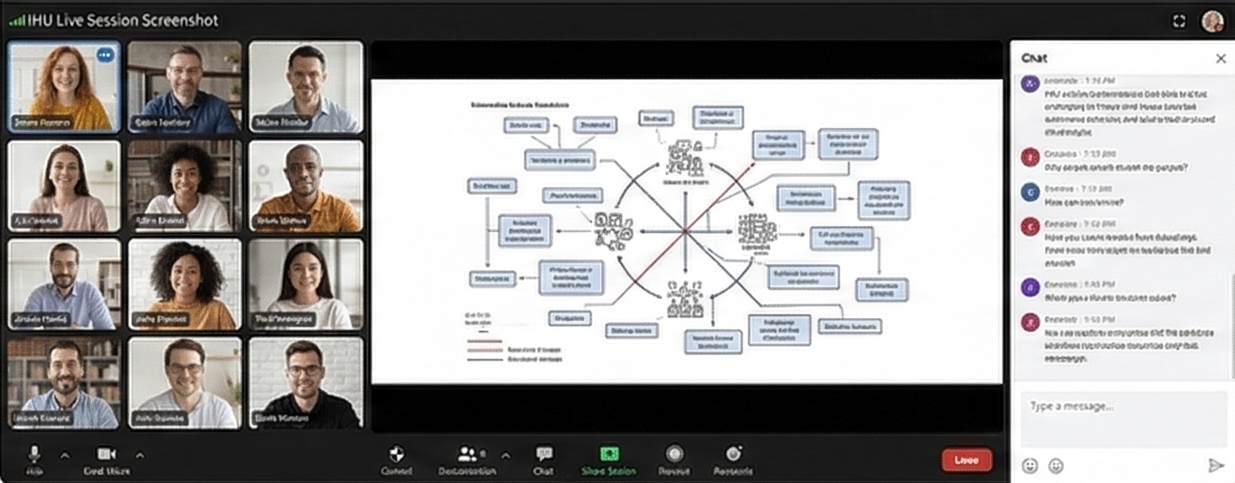
Live Session
IHU Live Session Screenshot
Step 3

Live Sessions & Interaction

Join live webinars with one click. Engage through video, chat, polls, and Q&A. Professors use interactive whiteboards and screen sharing to deliver dynamic, engaging lectures that feel anything but remote.

  • One-click join from dashboard
  • Multi-mode interaction (video, chat, polls)
  • Automatic recording for later review
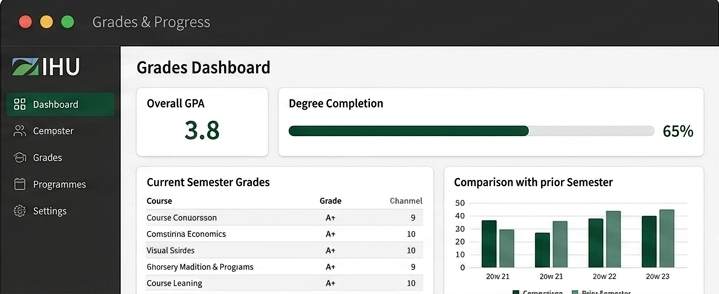
Grades & Progress
IHU Grades Dashboard Screenshot
Step 4

Grades & Degree Progress

View your grades as they're posted, track your cumulative GPA, and monitor your degree completion percentage. Visual progress bars and semester comparisons help you understand your academic trajectory.

  • Real-time grade updates
  • Visual degree completion tracker
  • Semester-by-semester GPA history

Learn on Any Device, Anywhere

IHU's virtual classroom is fully responsive and optimized for every screen size. Start a lecture on your laptop, continue on your tablet, and review on your phone.

Desktop & Laptop

The full-featured experience. Access all tools, attend live sessions with HD video, and work on complex assignments with maximum screen real estate.

Chrome, Firefox, Safari, Edge Windows, macOS, Linux Full HD video support

Tablet

The perfect balance of portability and screen size. Read materials, watch lectures, and participate in discussions with touch-optimized navigation.

iPad, Android tablets Touch-optimized interface Offline content download

Smartphone

Stay connected on the go. Check announcements, participate in discussions, review grades, and listen to audio lectures from anywhere with a mobile connection.

iOS and Android Push notifications Audio-only lecture mode

What You Need to Get Started

Our platform is designed to work with standard hardware and internet connections. Here's what you'll need for the best experience.

Requirement Minimum Recommended
Internet Speed 5 Mbps download 25+ Mbps download
Web Browser Chrome 90+, Firefox 88+ Latest Chrome or Firefox
Operating System Windows 10, macOS 10.14 Windows 11, macOS 13+
RAM 4 GB 8+ GB
Display 1280 x 720 1920 x 1080 (Full HD)
Webcam 720p built-in camera 1080p external webcam
Microphone Built-in microphone USB headset with mic
Speakers/Headset Built-in speakers Noise-cancelling headset
Software PDF reader, word processor Microsoft 365 or Google Workspace

Your Data, Your Privacy, Our Priority

IHU takes the security of your academic data and personal information seriously. Our platform is built with enterprise-grade security at every layer.

End-to-End Encryption

All data transmitted between your device and our servers is protected with 256-bit SSL/TLS encryption. Live video sessions, file uploads, and chat messages are encrypted in transit and at rest.

Two-Factor Authentication

Protect your account with two-factor authentication (2FA). Every login requires both your password and a verification code sent to your device, preventing unauthorized access.

FERPA Compliance

As a US-based institution, IHU fully complies with the Family Educational Rights and Privacy Act (FERPA), ensuring that your educational records are handled with the highest legal standards of confidentiality.

Secure Cloud Infrastructure

Our platform is hosted on enterprise-grade cloud infrastructure with redundant data centers, automated backups, and 99.9% uptime guarantee. Your data is always available and always safe.

Exam Proctoring Integrity

Online exams use AI-assisted proctoring to ensure academic integrity without invasive monitoring. Identity verification, browser lockdown, and activity logging maintain fair assessment standards.

Transparent Privacy Policy

We are transparent about what data we collect, how we use it, and who has access to it. Our privacy policy is written in clear language and available for every student to review before enrollment.

Virtual Classroom FAQ

Quick answers to the most frequently asked questions about the IHU virtual learning experience.

No. IHU's virtual classroom runs entirely in your web browser. There is nothing to download, install, or update. Simply log in through any modern browser (Chrome, Firefox, Safari, or Edge) and you're ready to learn.

All live sessions are automatically recorded and available for replay within 2 hours of the session ending. You can watch at your own pace, pause, rewind, and take notes — just like being there. Recordings remain accessible for the entire semester.

Yes. Many course materials — including PDFs, reading lists, lecture transcripts, and select video content — can be downloaded for offline access. Our mobile app also supports offline content caching so you can study during commutes or in areas with limited connectivity.

Online exams are administered through our secure assessment module. Depending on the course, exams may include timed multiple-choice questions, essay responses, project submissions, or oral presentations. For proctored exams, our AI-assisted proctoring system monitors the session while respecting your privacy — no intrusive software installation is required.

Live sessions are scheduled in Eastern Standard Time (EST / UTC-5). However, many courses offer multiple session times to accommodate students in different time zones. Your student portal automatically converts all times to your local time zone for convenience.

Absolutely. Our IT Help Desk operates 24 hours a day, 7 days a week. You can reach us via live chat (fastest), email (info@ih.university), or phone (+1 302-555-0199). Most issues are resolved within 15 minutes. We also maintain an extensive self-help knowledge base with guides, video tutorials, and troubleshooting articles.

Experience the IHU Virtual Classroom

Join thousands of students learning from anywhere in the world. Your campus is wherever you are.